更新日誌影片
改了什麼,就直接呈現改動本身:diff、輸出、前後對比。
怎麼用
- 1複製安裝提示詞,貼給你的 Agent。
- 2Agent 先執行 mo doctor,檢查 Node.js、FFmpeg 和 Chrome;缺什麼會告訴你怎麼裝。
- 3把素材交給它,它會在你的電腦上算圖輸出 MP4;想改哪裡,直接說。
貼到 Claude Code、Codex、Cursor 或任何支援 Skill 的 Agent。
開始只需要
無需 API Key有這個就能開始
- 程式碼、PR 或 Agent 對話
執行環境
Node.js 22+、FFmpeg、Chrome。不需要 API Key。
開始前,Agent 會執行 mo doctor 檢查 Node.js、FFmpeg 和 Chrome,缺什麼會告訴你怎麼裝;如果這個 Skill 還需要別的(例如字幕要用的 whisper),它的說明裡會寫明。
Make a changelog-video of what changed from v2.3.0 to v2.4.0, from CHANGELOG.md and the tag's commits; show the new --watch flag with its real output and the settings screen before and after, and end on our install command.
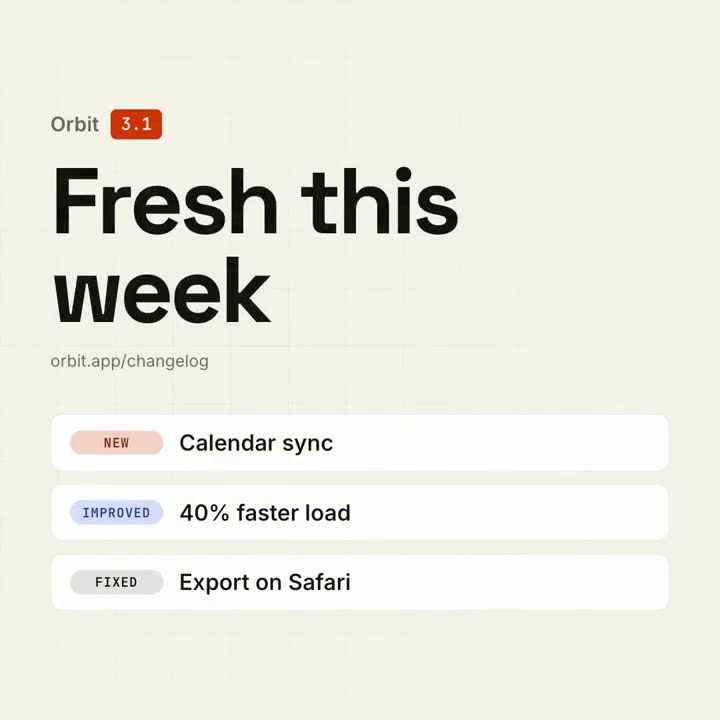
Make a 10-second 16:9 release notes video for [who will watch, e.g. our users], playing [where, e.g. in-app and on X]. Use only the version and changes I give below; don't add or reword items. Deep navy background with a faint grid.

On the left, the product name with a violet version badge pops in above a big bold "What's new" headline that rises letter by letter, with the availability line beneath. On the right, four rounded cards slide in one after another, each with a small colored tag (NEW, IMPROVED, FIXED) and one line of text. End frame: each card's border lights up violet in turn.

Product and version: [e.g. Northwind v2.4]
Availability line: [e.g. "Available today · northwind.dev/changelog"]
Four changes with tags: [e.g. NEW — Brand kits]
無需安裝:貼到 Claude Motion(Team 或 Enterprise),或直接傳給 Opus 5.5,就能得到相近的風格。每次執行結果會有差異;用 Skill 則根據你的素材,在你的電腦上算圖。
常見問題
怎麼把版本說明做成影片?
安裝更新日誌影片,然後讓你在 Claude Code、Codex 或 Cursor 裡的 Agent 讀取 CHANGELOG.md、某個版本的說明、兩個 tag 之間的提交,或一個 PR。它會把重要的改動(破壞性變更一定會放,你指定了重點改動就放在最前)照真實的樣子呈現:diff、指令及其輸出,或前後畫面。約 10 秒可呈現三條改動,12–18 秒最多五條;其餘的在結尾卡片上計數。支援 16:9、1:1 或 9:16,配有專屬配樂。
它能呈現觀眾真正讀得清的程式碼嗎?
可以,這正是這個樣式的意義所在。它只呈現改動過的行,16:9 成片中字級至少 56 px(1:1 為 36 px),用 − 和 + 標出刪改行,並在真實的程式碼主題(你文件的主題,或 GitHub Light / Dark)裡標出改動的字詞。過長的行只擷取改動的部分,用「…」省略;程式碼本身絕不會為了成片而改寫。它取代了舊的程式碼展示範本。
如果某個改動沒什麼可呈現的呢?
程式碼公開的話,它會呈現這處改動的 diff;否則就把更新日誌裡的那一條放大排出來,或在結尾卡片上計數。它絕不會畫出不真實的圖表或畫面,你的說明裡沒有依據的數字或說法(「快 2 倍」「使用者很喜歡」)也不會放上畫面;你的 Agent 會告訴你它省略了什麼,以及需要什麼來源才能放上去。
更新日誌影片這個技能免費嗎?
更新日誌影片單獨購買為 $4.90,並包含在每個方案中。如果你在 2026 年 10 月 30 日之前下載過舊版更新日誌影片範本,你可以繼續使用這個技能。想免費做第一支影片,用 Google 登入後,免費的 Motion Director 會根據你的版本說明做一支短片。
能做更長的版本發布影片嗎?
這個樣式維持在約 10 秒或 12–18 秒,方便在動態消息裡看完。想要完整的版本發布影片,讓產品出現在畫面上、並圍繞它講一個故事,請用發表片:它同樣能讀取這個版本或 PR。